Project Ottawa, Second Draft
Now available at https://thewilsonproject.com/ottawa/.
Will be making further revisions/additions in the coming weeks.
 The Wilson Project Blog of UX/Front-End Developer Ivan Wilson
 Now available at https://thewilsonproject.com/ottawa/.
Will be making further revisions/additions in the coming weeks.
a method of building a visual model of an web application UI/front-end layer
During the past four months, I have been presenting previews of sketches and notes from my notebook via Flickr.
Preview Sketches:
Project Ottawa [or the Ottawa model/diagrams] started in late February, prior to my trip to Ottawa for Jonathan Snook’s SMACSS Workshop. It was there that I did the first initial sketches post-workshop and a few weeks later, created the first draft.
After some review and criticism from a fellow co-worker, I decided to work on the second draft. This took more twice as much time as the first, with testing and constant revisions. However, at this point, I am writing the final pages and presenting the Second Draft as a microsite in early/mid July.
In short, the model is based on a) recent work on modularizing CSS (via Nicole Sullivan, Jonathan Snook and etc), b) analog to linear algebra, most specifically linear transforms, and c) my ideas on the UI layer, based on a concept called The Information Layer.
With these three items, I designed a visual “code” with symbols representing blocks of programming code and content. By examining mostly my own work, I developed the rules and basics to use the symbols to represent not the parts of the web application system, but also describing interactions withing the system.
The original purpose of this was archival, record keeping for myself. However, I began to realize that there was nothing out there that visually describes the work that FEDs [front-end developers] were doing. We have code and and can talk about CSS, HTML, etc. But, maybe for the first time, there was something that allowed the work to be visualized and be more tangible.
Currently, this is the second draft. Even though models are always being revised and changed, I kept the term “draft” because I wanted to present the working model in a state that was good enough for demonstrations. However, this draft appears, so far, to be close to being stable. Naturally, there is more work in the near future.
As I mentioned before, the final document will be presented as a microsite around early/mid July.
Before that, I created a single page preview, giving a brief overview of the model and its use in “mapping” a single page, AJAX driven site. This is based on the sketches/drawing from the last Flickr preview and the same example will be used as a case study in the final document/microsite.
A couple of months ago, I was looking at a promotional video touting some new technology. Something that was written solely for mobile. They went on about their processes, that by focusing not on the desktop, they were saving file size and increased performance, which is all and fine. Anything to life better, especially on those days when I want information without waiting for everything to compose itself during the morning rush hour. But at the end of this, I wanted to ask this question (which, in hindsight, I should have added to the comments):
Why should there be anything difference between the desktop and mobile?
Before answering, think about it real hard.
Don’t worry. I’ll wait…
The current paradigm of mobile is based on two things; the mobile phone and the tablet. But isn’t this the same sort of think we had before – the PC as the desktop. Didn’t we got over this? I got over this years ago, especially when my previous job required me to work with both Windows and Linux.
What I am thinking is that the current paradigm is just as short-sighted.
Let me put it this way? In a year or less, why not see a mobile device become the desktop?
Why not give the "desktop" have touch-enable events like its mobile cousins?
What I am imagining is the mobile/desktop schism not just disappearing. It simply gets redefined.
If my life is nearly almost located within the confines of my mobile phone, why not go all the way?
Our perception of the desktop is that of the monitor tethered to an external hard drive and et. al. What about a rapidly approaching near future where our version of the "desktop" is a mobile device tethered to cloud storage.
Just a thought?
Don’t wait too long.

Sorry for the three month delay. Usually reasons: work, personal, and fencing. I would say that nothing has changed but that would be a bold-faced lie. As a matter of fact, more things will be changing in the next six months than the last year.
Going to a number of events during the last couple of months of this year. Two of the most important are in the month of October:
In short, been really too busy to go any art exhibitions in the last couple of months. However, there are a few that I am trying to get to before they close in September.
As I mentioned before, many things will change. How much/what kind will be detailed more in the next TWP blog entry, called “A Love Letter.”
Indirectly, eventhough Project Charles ended in April, the Delta version of this site will be completed by the end of the year (if nothing else drops from the sky…).
Well, fencing will be…fencing. Practice three times per week, one competition per month. Still working out the schedule for 2011-2012 season.
Due to my work schedule, missed out on attending Met’s performance of Berg’s Wozzeck. However, looking at the 2011-2012 schedule, will be marking my calendar for the following operas:
Apart from the classical scene – Elbow comes to DC in September (Yeah!!!)
That is that I have for the next couple of months…
And yes, I will be taking a vacation. Back to the PNW (Portland, OR/Vancouver, Canada) for my birthday.
What’s that sound? That’s the sound of my Google Calendar crying like a baby…
(Originally published on CDG Interactive/Innate blog)
Earlier this year I attended the IxDA Interaction 11 conference in Boulder, Colorado, one of most important in the field of interaction design. At this conference, I’m both an observer of the field and a student, gleaning ideas I can use to improve my own skills.
In my three years of attendance, I’ve learned that interaction design is not just about building products — it’s also about how to visualize information. One of my jobs is taking HTML/CSS code and making the content not only visible but easily accessible to the user. At a time when massive amounts of data are freely available, finding ways to making information not only understandable but also easier to use and manage has become its own field of study.
So what does “visualizing information” mean? For example, take a basic weather map we see on the local evening news. Apart from the physical location and geographical borders, information about air pressure and temperature are shown in graphics, instead of a straight list of numbers and statistics. This same information is given some sort of context (work, travel, agriculture) for viewing. From this, we make judgments about what activities we want to do at a certain time period (going to work, growing crops, flying on vacation).
We can use maps to overlay any information we want, depending on what we need or want to do. But one use of a map is something that we have been doing since childhood: using a map with information to find something.
And that’s just what I did at IxDA in Boulder. Each year’s conference has a different twist, depending on the location. Home to The University of Colorado, Celestial Teas and a growing tech/design area, Boulder is nestled near the Rockies and has a reputation as being eco-friendly. Well, when looking at the list of Friday activities, I found one that caught my attention: Geocaching: Treasure Hunt.
Geocaching is a hide-and-seek game where finders use GPS units or GPS-enable mobile phones to find caches. These caches are containers that have various items inside. They can be as large a small Tupperware case. Or they could be micro caches, which can be as small as a 35mm film canister. Either one, these are located in publicly accessible areas and are hidden from view. However, the owner of a cache will leave some clues (text, title name, or images) for the finder to locate it. Of course, having a GPS unit does not mean it will be easy to find. If you have ever used one, you know that there is a certain range of accuracy depending on the signal and location.
Occasionally, these caches will have a travel bug, a type of GPS-enabled tag with a unique ID that the finder/owner can move to any location and place inside another cache. Once the cache has been found, the finder must leave something of equal/higher value in the cache, especially if something is taken from it. The finder marks that she/he found the cache via paper/app/website and replaces the cache in the exact spot for others to find.
Hmmm. Hide and seek with GPS tools. Exercise with actual pay off. Sign me up!
Following lunch on Friday, the group got together. I was matched up with Jill, one of the advisors, due to the fact that we both we the only ones in the group who had Android phones. (BTW…interaction designers luv iPhones. Just an observation… ) I downloaded an app (there are a number of apps for iPhone and Android) beforehand and played around prior to the trip. It also helps if you have the latest upgrade of Google Maps on your phone with navigation abilities.
We traveled to an area in Boulder where we separated into three groups. The group I was in located a micro cache about 0.7 miles north and we walked down some streets to the location. This was located in a parking lot (caches need to be in a public place). The GPS trackers got to about a couple of feet nearby. However, it had snowed a few days prior and the parking lot was covered in snow mounds about a few feet thick. I tried digging with gloves to see if I could find it but to no avail. Everyone searched around the area but no luck. Considering the area was still snowbound and we were finding a small micro cache, we decided to search for another one.
Looking at the geocaching app, we found another micro cache only a few meters away north. Unfortunately, we came up empty again – a snowbound area with little clue to finding it.
We decided to move to another one, this time a regular sized cache. This one was about 0.3mi west from our present location. Crossing streets and more parking lots later, we finally got to the location. Many of us recognized the location because of the clue given in the title. Like I mentioned before, the GPS only gives you a close proximity to the location; you still have to figure out where it actually is. Another clue pointed to its actual location. That’s easy enough.
Well, almost. Now, you have to try to get it out. Remember, these caches were not meant to be easy to find in the first place…
The tallest of the group reached in and pulled out the prize – one round metal candy tin. After a few hours of searching and coming up with the third choice, needless to say we were all ecstatic (judging from the group picture afterwards). Then we opened our prize.
Caches contain any sort of object left over from the previous finders or owner. (There are rules to what can or cannot be put there). This one had a simple log book, with list of names and dates, referring when the cache was discovered. One of the more interesting items is a small tale/story in two small pieces of paper, folded in the cache. It also had a squashed penny. This cache had a travel bug, which was taken by our advisor to be placed in another cache. As the custom, we had to put something back into the cache. A few items were put into the cache from other but someone shouted out “Does anyone have a coin?” I had some Canadian coins on me and threw in a “toonie” or a 2-dollar Canadian coin into the cache.
[By mentioning this, everyone here in the Innate office will automatically reply “Of course, he has one!” Needless to say, I take a lot of trips to Canada.]
Well after the celebration and signing of the small log book, everything was sealed up and the cache was place back in the same location before. The adviser marked the find on the site, along with the items that we placed in the cache.
Mission completed. Smiles but tired walking back to the bus and then back to the hotel. For me, the day was complete.
Now, when I work with information and its display, I’ll remember the connections between data and discovery that are made when geocaching.
P.S. I mentioned the travel bug earlier. Beforehand, it was revealed that one of goals, besides finding the caches, was to have at least one of the travel bugs moved bit-by-bit to the location of the next conference – Interaction 12 in Dublin, Ireland in February 2012. If this one makes it, it will no doubt be very well received.
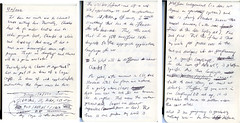
First notes from my Moleskin notebook (Project Charles – Volume 1), 5/10/2009 entry
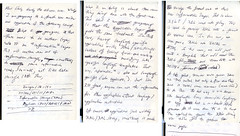
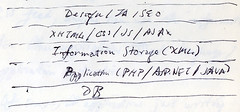
First sketch of new information model (same date)
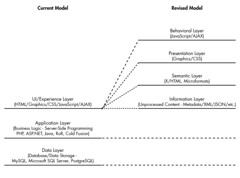
New information model (current view, comparing with previous model) – Basis for “The Information Layer” essay
After two years this month, I have decided to end Project Charles in April. This will also mark the 10th anniversary of The Wilson Project.
@iwilsonjr (4:59 PM · Mar 14, 2011) – https://twitter.com/iwilsonjr/status/47401561944637440
Depending on the ever changing schedule, Project Charles will be ending this year, if not sooner. After a long two years, I should be happy.
I'm exhausted.
I've carried this thing around, weathering all the stuff that gets thrown at me in the course of human life. This project became the internal motor of change, reflection, and experimentation. And a number of people have really benefitted from the results.
The basis of Project Charles was redesigning The Wilson Project with the state of the art techniques in front-end development. No, we are not talking about the dazzling canvas experiments and all the fireworks. It was about learning all this new stuff to be able, like an experienced chef, to use this wider pallette to improve their work. Well, I'm still doing that. But Project Charles brought about an urgency to the process.
Well, that urgency has come full circle. It's at a point where this project needs to end in order to go further on with other things. And since The Wilson Project Site is a working blog (and soon-to-be) portfolio site, I needed to end this thing to start doing new projects. And basically, I just need this monkey off my back. So why am I writing this blog entry?
Because I feel that the need to apologize [to myself].
This project was started with the idea of using XSLT via Symphony CMS. It's a very interesting application that I am sure will grow and improve. The cast of characters over there are currently working on the third version as I am writing this.
Now, I'm in a time crunch. I cannot, at this time, learn XSLT and learn a new CMS without some focused time and effort. Unfortunately, considering the numerous hiatus periods in this project, that will never happen. So I took the hard choice and decided to move the project back to WordPress to speed up completion. I'm relieved at be removed of this burden. But I also feel sad, as I made some sort of bad compromised to complete this project. I know I shouldn't, but I'll live. I may feel bad for not completing the project in the way that I wanted fully but I have to move on.
The other reason for Project Charles was conceptual. The "residue" of studying and observing the work around me of interaction design and front-end development. Yes, I have a few ideas that I've squirrel away.
It's called The Information Layer.
Ideally, Charles would have been the best demo, especially with Symphony/XSLT. But with the external changes of the last two years, there is a real need to share something now and not wait further down the road for an actual demo model.
So, I'm shipping now. Everything can wait.
I need my life back.